A media kit is a document you can send to brands to show them your stats, examples of your content and include any paid packages you may offer for potential collaborations. This blog is going to tell you more about them, what to include in them and how to make one!
What is a media kit and what are they for?
A media kit is a document including details about you and your blog/social media accounts. It should be representative of your brand with the intention of being sent to possible brands you want to work with. The point of a media kit is to tell yourself to possible collaborators, it should be an easy place to view a summary of your blog including your stats and usernames.
You can either send your media kit as a reply to brands emailing you or when you make first contact with a brand yourself to show them your statistics.
What should your media kit include?
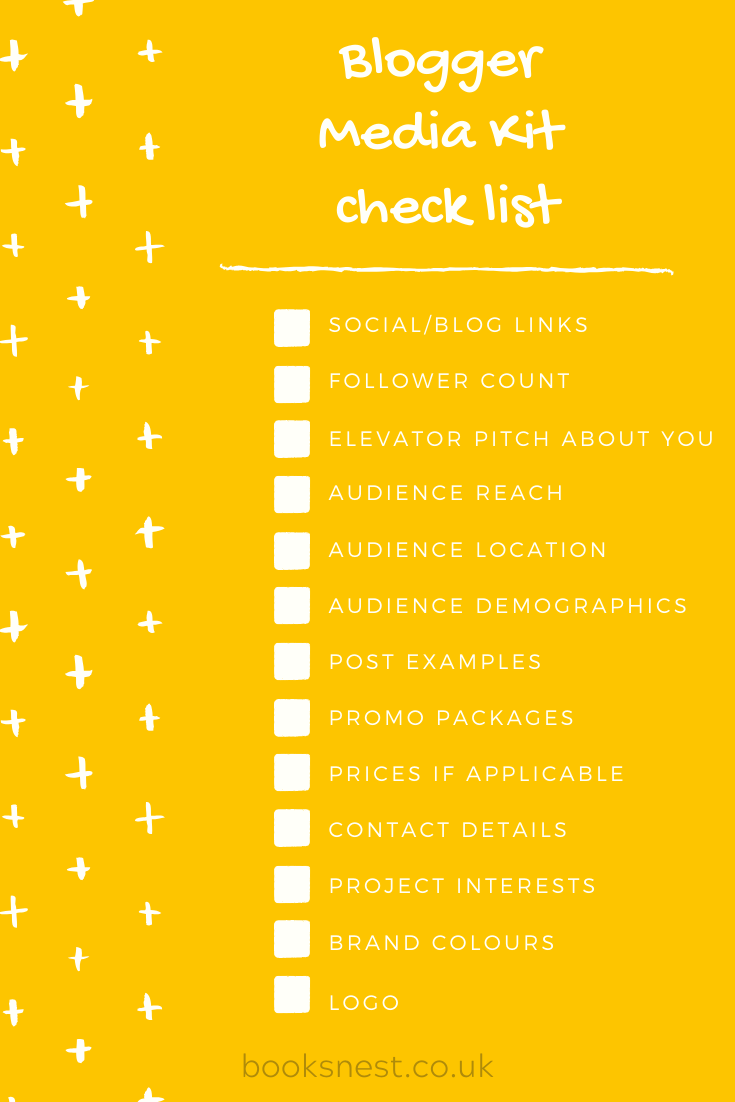
I’ve created a checklist to show you easily what you should be including in your media kit. That main highlights from this list would be:
- Your social media and blog links – to show brands where you would post your content.
- Your follower count and audience insights – to demonstrate your current reach and show a brand what they could expect.
- An elevator pitch to sell yourself in a few lines – to easily summarise who you are.
- Packages you can offer brands – this gives brands an easy choice of packages if they want to work with you. This should ideally include prices.
Where can you make a media kit?
Canva is the best place I would suggest to head to and make your media kit. They have ready-made templates you can use, or you can make your own from scratch. The templates are handy because they show you examples of what you should be including in your kit. Of course, you can also make a media kit in Photoshop, but Canva is a free option and you can even use it on your smartphone!
I would suggest using any brand colours and logos in your media kit to make it match your blog aesthetic. This helps to tie together the idea of your brand and ultimately will look better for any companies you send your kit to. You can set two brand colours with the free version of Canva and with the paid version can add your own fonts to really match up with your blog.

What are the benefits of a media kit?
- Easy access to your basic stats
- Looks more professional to send to brands
- Easier for you to send these details on rather than typing them up into an email
- One place for all of your stats
- Can sit on your blog for brands to find.
I hope this has helped offer an insight into what a media kit is and has helped you be able to create your own. You can click on the Media Kit tab in my menu to view my up to date media kit. Personally I don’t include my prices publicly but have a slightly different media kit that I send to brands including prices.